🎨 Admin Core Features and Dual Editor Overview
This document provides a brief overview of the core features in the admin console, including multi-language simultaneous publishing, device-specific layout configuration, and real-time design theme settings.
📝 1. Multi-Language Writing and Dual Editor Support
When entering the writing menu, a multi-language editor layout is provided, with multiple language tabs arranged side-by-side on a single screen.
① Batch Multi-Language Writing and Saving
- Writing Flow: Switch between the language tabs (KO, EN, JA, etc.) at the top to write titles, excerpts, slugs (URL paths), and body content for each language.
- Batch Saving: Click the [Save All Tabs Simultaneously] button at the bottom to save the content of all languages to the database at once. Languages not explicitly set to Publish will be saved as Drafts, and any empty language tabs will be skipped.
② Dual Editor Support (Visual vs. Markdown)
- Visual HTML Editor (Visual): A rich-text editor that allows direct formatting and media embedding. Image files can be easily uploaded and inserted via the toolbar button.
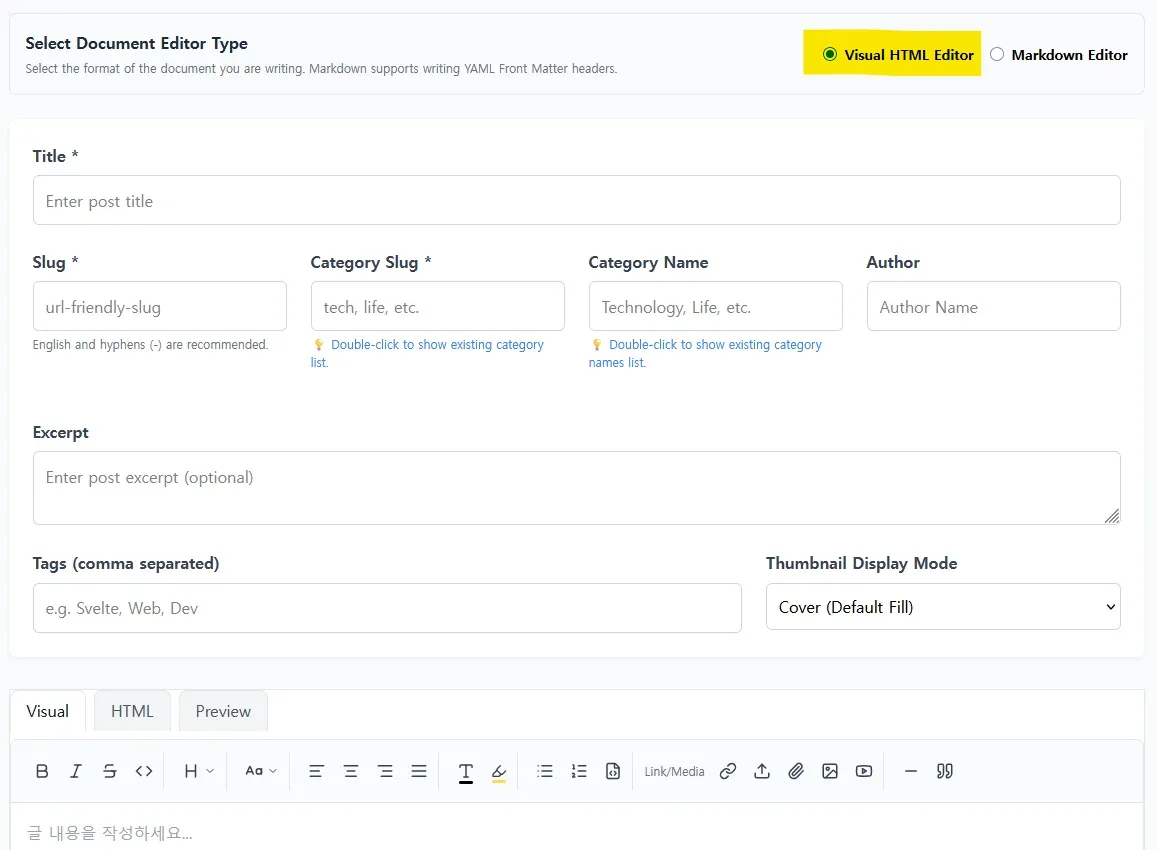
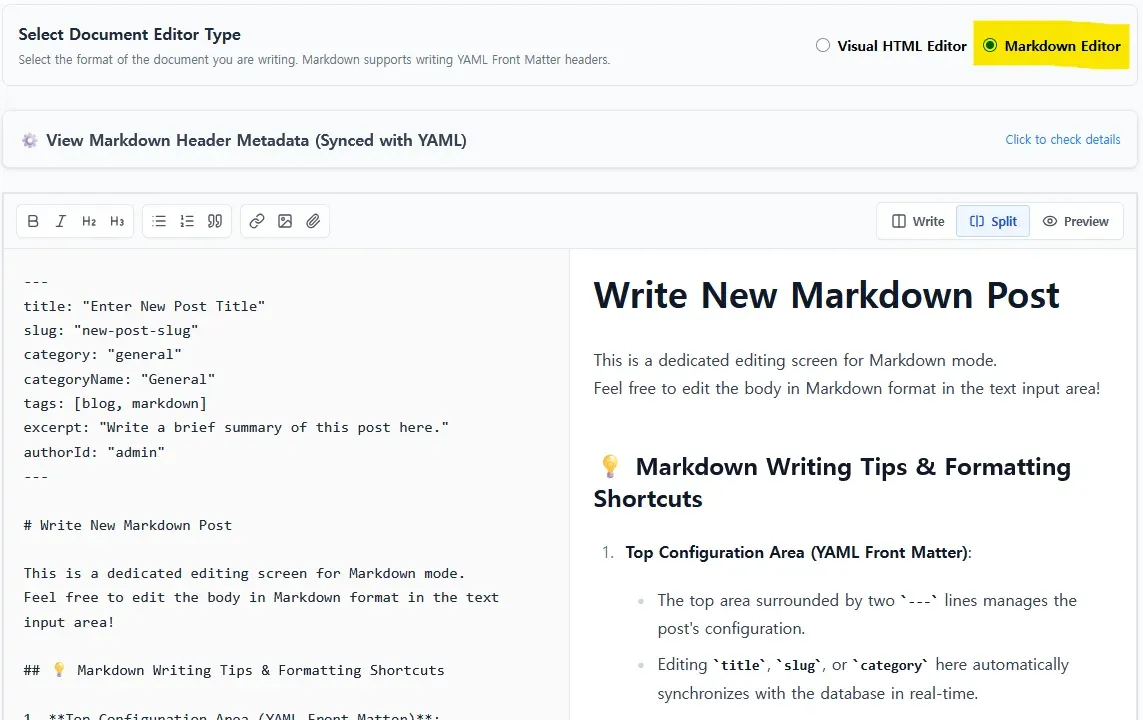
- Markdown Editor (Markdown): Provided for users who prefer markdown syntax. Metadata such as titles, excerpts, categories, and tags are automatically managed in the header using YAML Front Matter (
---). Both markdown source and parsed HTML are stored in the database upon saving.
③ Automatic Thumbnail Selection
- If no thumbnail image is manually specified, the system automatically analyzes the content to assign a representative image:
- 1st Priority: The first image element found in the body text.
- 2nd Priority: If no images are present but a YouTube video link or iframe embed is found, the official high-resolution YouTube thumbnail URL of the video is used.
🧱 2. Device-Specific (Desktop/Mobile) Independent Widget Placement
The layout editor supports drag-and-drop widget arrangement for sidebars and content areas, allowing you to configure independent widget exposure based on whether visitors are on desktop or mobile devices.
⚙️ Device Exposure Options
- Choose the column layout and width ratio in the
Blog Structuretab under theDesign Editormenu. - Assign device exposure conditions (Device) when adding or modifying widgets:
- Desktop: Displays the widget only on wider PC screens, preventing unnecessary resource loads on mobile devices.
- Mobile: Hides the widget on PC screens and limits visibility to mobile viewport resolutions.
- Effect: Skipping heavy or redundant widget rendering for mobile visitors optimizes page load times and mobile scrolling performance.
🎨 3. Real-Time Design Editor and Theme Settings
Design theme changes and background configurations apply instantly via CSS variables in the visitor's browser without requiring server rebuilds or redeployments.
- 4 Background Types: Select from Solid color, Gradient, Background Image, or interactive HTML5 Canvas animations (Canvas).
- Glassmorphism Effect: When using background images, adjust opacity and blur to ensure text readability with glassmorphism overlays.
- Interactive Canvas: Renders motion artwork (snowflakes, waves, constellations) inside a sandboxed canvas.
[!TIP]
Information on background configuration options and script templates can be found in the Design Editor Settings Introduction document.
💾 4. Media Storage Support
You can switch the active cloud storage provider for uploading and serving media based on your needs.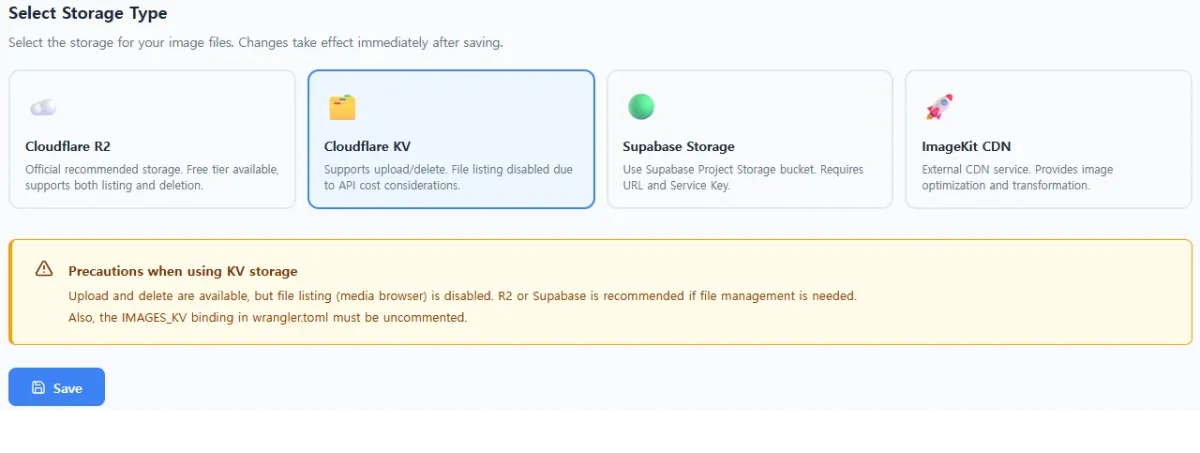
- Navigate to the
Storage Settingsarea at the bottom of theMedia Librarymenu. - Select your storage provider and configure the credentials:
- Cloudflare KV: Stores assets in edge KV storage for fast global delivery.
- Cloudflare R2: Cost-effective large object storage for managing mass images.
- Supabase Storage: Securely uploads and stores media assets in Supabase storage buckets.
- ImageKit.io: Connects global image CDN platforms for real-time optimization and compressed formatting.
- Real-time Switch: Saving changes instantly shifts the active upload engine to the chosen storage provider.
[!NOTE]
Limitations of default storage (Cloudflare KV) in media explorer
Cloudflare KV does not support directory listing (read APIs) in the image explorer to minimize Workers usage and costs. Other external storages, such as Cloudflare R2, Supabase Storage, and ImageKit.io, fully support listing and previewing uploaded images.
0 Comments
Login is required to write comments.