🌐 Blog Homepage Layout and Getting Started with Login
This document provides a brief overview of the blog (apps/blog) homepage layout and basic login/registration methods.
🎨 1. Blog Layout and Navigation
The blog layout is designed to help visitors locate information efficiently (Header, Sidebar, Main Content, and Footer).
- Navigation Header (Header):
- Site Logo: Click to return to the homepage at any time.
- Shortcut Menu: Lists primary links configured by the administrator (e.g., categories, external channels).
- Language Selector: Click the globe icon to switch both menu languages and post translations instantly.
- Sidebar:
- Displays category lists, the author profile card, and popular tags on desktop screens.
- Automatically hidden on mobile resolutions to optimize readability and scrolling.
- Main Content:
- Shows category filters and the latest published articles in card format.
🔑 2. Registration and Login
Supports account registration and login for writing comments or guestbook entries.
⚙️ Supported Login and Sign-Up Methods
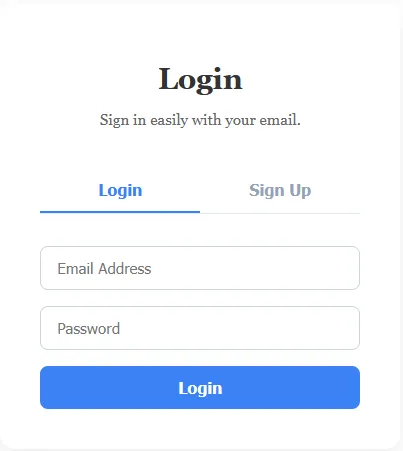
- Default Email Login/Sign-Up (Default):
- Enabled by default post-installation. Users can sign up by providing an email address, display name (nickname), and password. Auto-login applies immediately upon successful registration.
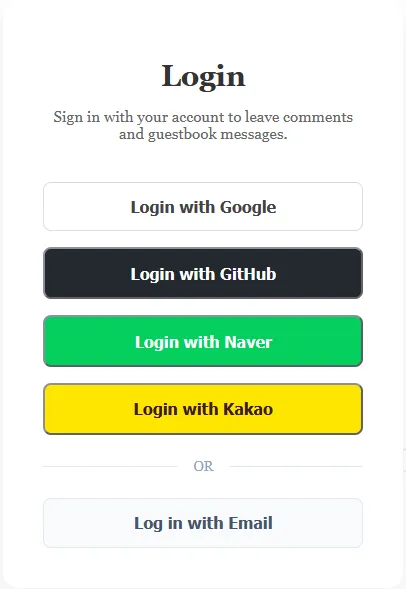
- Social Login (Better-Auth):
- Powered by the Better-Auth engine, supporting 21 social login providers including Google, GitHub, Kakao, and Naver.
- Social login buttons will only appear and function on the login screen after the administrator configures the respective client IDs and secrets as environment variables on the backend. (Integration details for social providers will be detailed in separate upcoming documents.)
- Login Status Display:
- Upon logging in, the top-right button switches to your profile image icon and a link to my-page.
- Note: The user profile photo integration is currently in progress and may display a default profile icon instead.
0 Comments
Login is required to write comments.